
Differences (purchase versions): viflow 10 | viflow 9
Applies to: viflow (10 | 9) | Article: 3862361 | Updated on 26.06.2026
Merge objects
In viflow 10, objects can be merged. To do this, select the object you want to merge with another object. Then go to the Home tab – Merge {{1}} and select the object you want to be incorporated into the selected object. A very useful feature, for example to remove duplicate users without losing important data.
All information about this function can be found in the viflow help under ››› Start tab – viflow object – Merge.
In viflow 9 this function is not available; merging objects, including matching properties, must be done manually.
DeleteExport function for translating individual graphics
In viflow 10, it is possible to select individual objects for translation and export them to an Excel spreadsheet, with or without sub-objects. Simply select the corresponding option from the context menu.
Exporting to an Excel spreadsheet is also possible in viflow 9, but without the option to select individual objects.
The function is described in detail in the viflow help: ››› Translation of content languages.
DeleteNew example process model and optimized template selection
With viflow 10, you receive a completely rebuilt, updated sample process model that complies with current standards. This model is not intended for your own modeling needs, but it serves as a good example of how a modern process model can be structured within your company.
The example model in viflow 9 no longer fully reflects the current state of affairs.
The menu for creating new process models has been redesigned in viflow 10 and offers a clear, uncluttered view for selecting all process model templates.
Optimized zoom function in the web model
The WebModel of viflow 10 now includes a zoom button.
After clicking, the zoom level can be changed using a slider. A second button allows the zoom level to be adjusted to the window. This is a significant improvement in convenience compared to viflow 9, where zooming is controlled, among other things, via the mouse wheel.
Sharing function in the web model
To share a link to an image from within the WebModel in viflow 10, simply click the "Share" option in the context menu of a viflow object. An email will then open containing a link to the image. In viflow 9, splitting processes is possible manually.
Custom search profiles in the web model
In viflow 10 WebModel, frequently used queries with specific search criteria can be saved as profiles. In the desired list view, click the three dots in the lower right corner, enter a name for the profile, and click the plus icon.
The saved search profile now appears above the input field and can be selected from there. It can be deleted by clicking the [X] next to the search profile.
This feature is not included in viflow 9.
DeleteSuffix for information and connectors
In viflow 10, information objects and connectors can be assigned not only a prefix but also a suffix via their local properties. As with the prefix, a separator can be selected separately.
This allows you to present the flow of information in your graphics in a more customized way.
This option is not available in viflow 9. Delete
View of structure or folder view when WebModel starts
In the WebModel, viflow 10 allows you to configure the contents of the main and properties windows as well as the cockpit selection options after exporting.
Furthermore, you can choose whether the object trees are displayed in structure or folder view when the WebModel starts. To do this, activate or deactivate the corresponding entries under Settings – Administrative Settings .
This saves you the potentially necessary subsequent adjustment of the start view, which is required in viflow 9.
DeleteOptionally showing or hiding the sidebar in the WebModel
The sidebar in the viflow WebModel can be displayed expanded or collapsed on startup in viflow 10. We have added the option "Show sidebar on startup" under Settings – Administrative Settings for this purpose.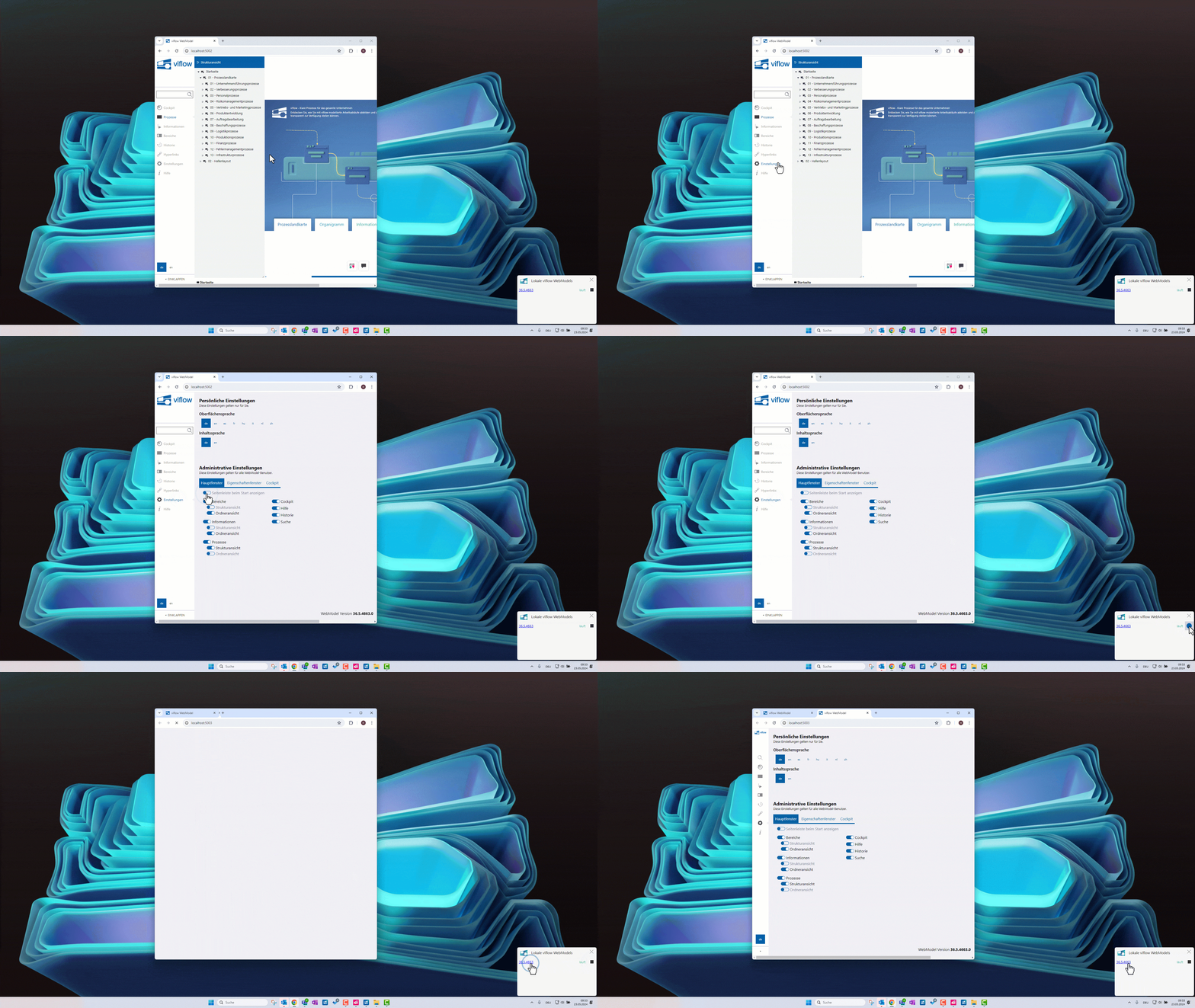
Delete
viflow interface also available in Spanish
The viflow user interface is available in several languages. In addition to German, English, French, Italian, Chinese, Dutch, and Hungarian, Spanish has now been added in viflow 10.